DocsStart
On this page
Notifications
The app shows the state while it is open. For the rest of the time the agent sends messages itself, to channels you already run.
When a message is sent#
- Opened: an issue has lasted
NOTIFY_AFTER_SECONDS(default 300). A rollout or a planned node reboot that heals within five minutes never reaches your phone. - Escalated: an issue that was sent as a warning turns critical.
- Resolved: an issue that was sent is gone. An issue that was never sent produces no "resolved" either.
stateDiagram-v2
  direction LR
  [*] --> waiting: issue appears
  waiting --> [*]: healed within 5 min (nothing sent)
  waiting --> sent: still there after 5 min, "opened"
  sent --> sent: turns critical, "escalated"
  sent --> [*]: gone, "resolved"
  waiting --> held: silenced or maintenance
  sent --> held: silenced or maintenance
  held --> waiting: silence or window ends
All changes of one run are one message per channel. Priority: 5 (urgent) when anything critical is in it, 3 for warnings, 2 for resolutions only.
homelab: 2 problems
🔴 default/social-importer: CrashLoopBackOff: back-off 5m0s restarting failed container. Last exit: Error (code 1). 14 restarts.
🟡 Last backup of default/shop-api-pg was 31 h ago: Expected at least every 26 h. Is the ScheduledBackup still running?
✅ resolved: Certificate translate.shop.example expires in 9 days
Messages are written in the agent's LANGUAGE (en by default, or de; Helm language), whatever language the app is set to: a message has no reader to ask. With LANGUAGE=de the same message reads homelab: 2 Probleme, ✅ behoben: Zertifikat translate.shop.example läuft in 9 Tagen ab, and so on. Messages from the cluster itself (an alert's summary, a container's error) stay as they are.
If every channel fails, nothing is marked as sent and the next run tries again. Hints (e.g. a manual Argo CD app waiting for its sync) are never sent.
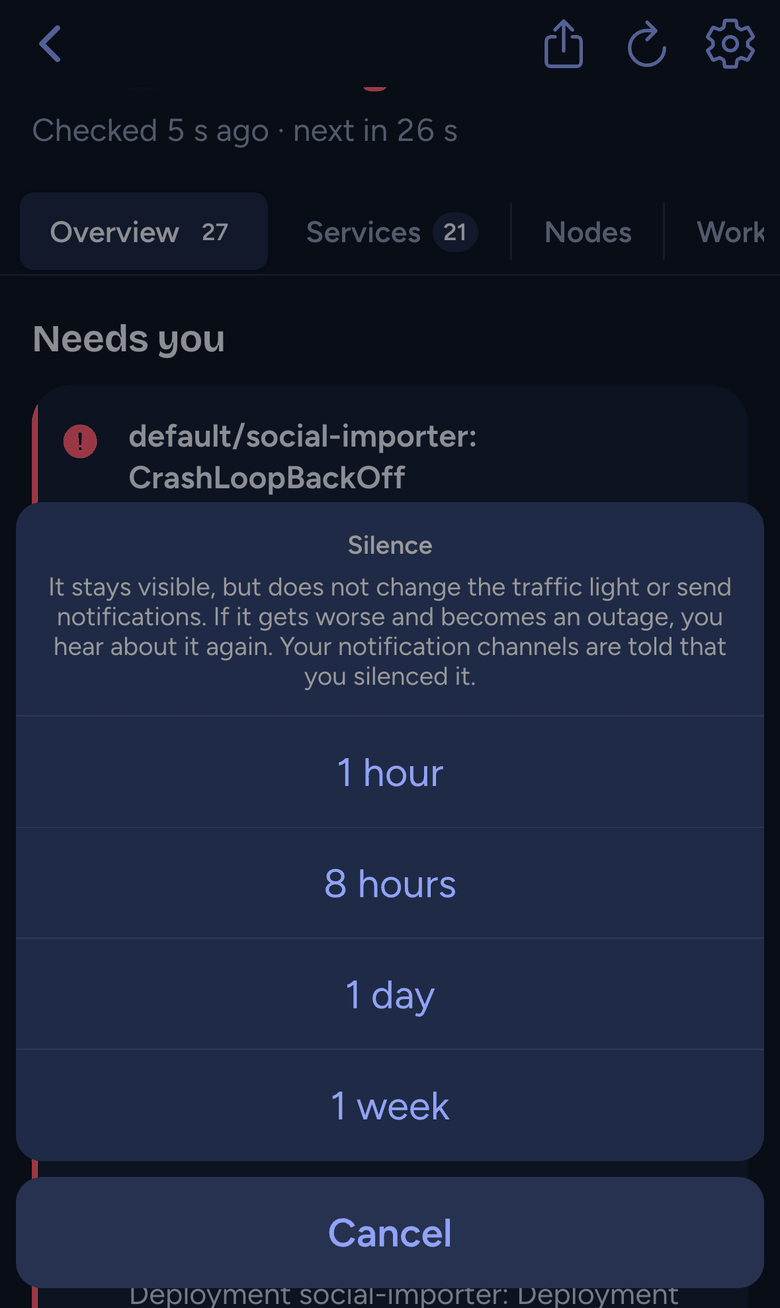
Silencing an issue from the app.
Silenced issues (in the app: "Silence" on an issue, for 1 hour, 8 hours, a day or a week) send nothing new while silenced: no "opened", no "escalated". Two limits keep a silence from hiding too much: it covers only the severity the issue had when it was silenced (a warning silenced for a week that becomes an outage notifies like any outage), and every silence of a warning or an outage is announced through your channels first, naming the device. Silencing never sends a "resolved" either; that only comes when the issue is really gone. Silences live in the ConfigMap kubernanny-settings and survive restarts; every silence is in the audit log with the device.
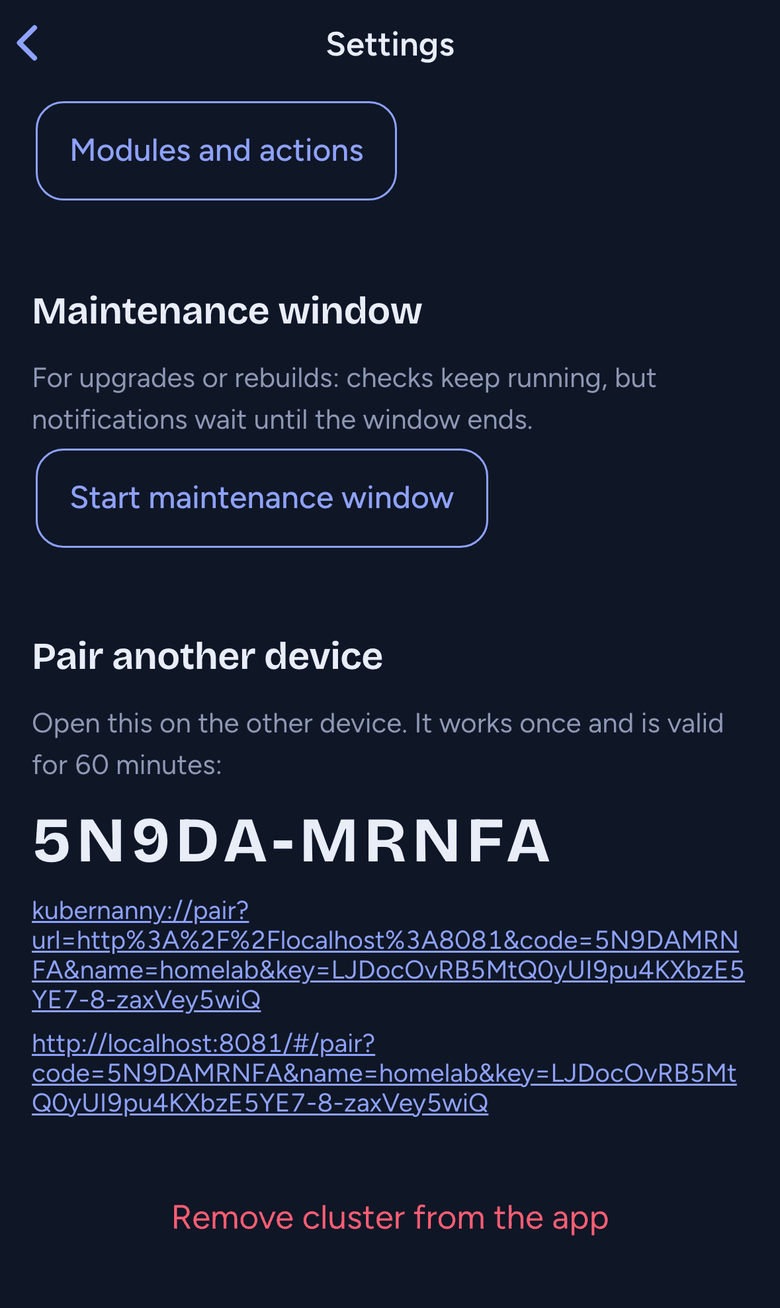
Maintenance window (in the app: cluster settings, for 1, 2, 4, 8 or 24 hours; POST /api/maintenance): planned work on the cluster without a phone that buzzes through it. The checks keep running and the app keeps showing the truth, with a banner until when; only messages wait. Whatever is still broken when the window ends is sent on the first run after it, and anything that broke and healed inside the window is never sent. It can be ended early, lives in kubernanny-settings like the silences and is in the audit log.
Weekly report (notifications.weeklyDigest.enabled: true, env DIGEST=weekly): every Monday at 9:00 (weekday, hour, in timezone), one message through the same channels:
homelab: weekly report
4 problems in the last 7 days, 1 of them critical. Open now: 1.
Longest:
🟡 Last backup of default/shop-api-pg was 31 h ago (28 h)
🔴 default/social-importer: CrashLoopBackOff (5 h, still open)
With detail: minimal only the first line. The agent keeps the week in memory: after a restart the report covers the time since then and says so, and it waits until the agent has watched for a day.
Pausing everything: cluster settings → "What is checked" → Notifications, or checks.disabled: [notifications] in the chart.
What leaves the cluster#
With the default detail: full: the cluster name, issue titles and causes, which contain namespaces, workload names and host names. With notifications.detail: minimal (NOTIFY_DETAIL=minimal) only this:
homelab: new problems
1 critical, 2 warnings. Details in Kubernanny.
Use minimal for public services like ntfy.sh, where anyone who guesses the topic reads along, or run ntfy inside the cluster. Notification URLs must be HTTPS (plain HTTP only to an in-cluster *.svc host) and redirects are refused.
Channels#
Set one or both of NTFY_URL and WEBHOOK_URL. The app's settings have a test notification button.
ntfy#
notifications:
  ntfyUrl: https://ntfy.sh/homelab-7f3a9c1e2b   # long random topic on ntfy.sh, or your own server
Title (RFC 2047 encoded, so umlauts survive), priority and tags are set; with PUBLIC_URL a tap opens Kubernanny. For a protected topic put NTFY_TOKEN into notifications.existingSecret.
Discord, Slack, Gotify, JSON#
WEBHOOK_URL is recognised by its shape; WEBHOOK_FORMAT overrides:
| Format | Detected from | Body |
|---|---|---|
discord |
discord.com/api/webhooks/… |
embed, coloured coral / amber / mint |
slack |
hooks.slack.com/… |
{ "text": "*title*\nbody" } |
gotify |
path ending in /message |
{ title, message, priority } (priority ×2: 10, 6, 4) |
json |
anything else | below |
{
  "cluster": "homelab",
  "title": "homelab: 2 Probleme",
  "body": "🔴 …\n🟡 …",
  "priority": 5,
  "opened": [{ "id": "pods/default/Deployment/social-importer", "title": "…", "severity": "critical", "cause": "…" }],
  "escalated": [],
  "resolved": [{ "id": "certificates/weblate/weblate-tls", "title": "…" }]
}
The JSON form is meant for n8n, Home Assistant, Node-RED or your own scripts. Webhook URLs often are credentials: put them into notifications.existingSecret as WEBHOOK_URL instead of the values file.
Native push#
Push straight to the Kubernanny app, without ntfy or Discord. Each message is sealed on the agent for the one device it goes to; the relay and Google carry it and cannot read it. Why it is built this way: decisions/0007.
sequenceDiagram
  participant A as Agent
  participant R as Relay
  participant G as Firebase Cloud Messaging
  participant P as Phone
  P->>A: POST /api/push/register {FCM token, platform, push public key} (sealed call)
  Note over A: issue lasts 5 min
  A->>A: seal title and body for that device's push key (HPKE)
  A->>R: Push frame on its relay WebSocket: token, key id, sealed bytes
  R->>G: messages:send (service account of the relay)
  G->>P: data message (Android) / via APNs (iOS)
  P->>P: open with the push key, show the text
In the app: a cluster's settings, "Push to this device". The app first asks you to pick your sign for pushes (below), then for permission to show notifications (never at start), makes a key pair for push on this cluster and registers it. The same place turns it off again, changes the sign and sends a test push. Tapping a push opens that cluster in the app. A removed device or cluster takes its registration with it. The option is hidden in the web app and in app builds without Firebase config, and shown locked when the deployment switched push off.
What it needs: the relay (relay.enabled, RELAY.md), and a relay that delivers push. The public relay does, for the app from the stores. Messages are the same as on every other channel: the five-minute rule, escalations, resolutions, silences, the maintenance window, security alerts and the weekly report, and with detail: minimal only counts (still sealed). The app is a channel like ntfy: it counts for the test button and for "a channel took it".
Who sees what#
| Party | Sees | Never sees |
|---|---|---|
| Agent | everything (it writes the message) | |
| Relay | the device's FCM token and platform, a key id, the size and time of each push, the agent id | title, body, cluster name, anything in the cluster |
| Google (FCM), Apple (APNs, iOS) | the token, the app, size and time | the content: it is sealed for the phone's push key |
| Phone | the message, opened with its push key for that cluster |
A message opens only if the agent sealed it: the phone checks it against the agent key it pinned at pairing. It is shown only if it is fresh, too: sealed within an hour of the phone's clock and later than the last push shown for that cluster (the phone keeps that time next to the push key). So nobody who relays pushes (the relay, Google) can record an "all fine" and play it back later over a real problem (PROTOCOL.md). On iOS a message that does not open, or is stale or replayed, shows a generic "Kubernanny: new status from a cluster", without your sign (iOS shows every alert that arrives); on Android it is dropped. A phone whose clock is off by more than an hour drops real pushes too: keep automatic time on.
Is this push real?#
A push without your sign did not come from your cluster. When you turn push on, the app asks you to pick a short sign: three emoji drawn at random from 64 (about 250,000 combinations, drawn again on request) or a word of your own, 3 to 12 characters. A single emoji from a short list would be guessed one time in eight; three random ones are not. It is kept only on the phone, next to the push keys (the shared keychain group on iOS, the Keystore-encrypted store on Android), the same for every cluster on that phone, and never sent to the agent, the relay or Google. Every push the phone opens is shown with it in front of the title, for example 🦉🌵⚓ homelab: 2 problems. Change it in a cluster's push section.
Why it is needed: whoever holds the relay's Firebase service account (the relay's operator, for the public relay the Kubernanny project, or anyone who steals that key) can make a registered phone show a notification with any text. Android shows an FCM notification message without the app's code, and iOS shows an APNs alert without mutable-content without the Notification Service Extension. FCM and APNs offer no way to forbid that. Kubernanny's own pushes never take that path: Android gets data-only messages that the app opens and shows itself, iOS always gets mutable-content with a placeholder that the extension replaces. A forged notification can say anything, but it can never carry a real cluster's text (that is sealed for your phone and signed by your agent), it cannot trigger any action (a tap at most opens a cluster already in the app: the Android service builds the tap's link itself, kubernanny://cluster with the app's own id, iOS hands the app only a key id, and nothing a push carries ever reaches the pairing page), and it cannot know your sign. To remove the third party, run your own relay with your own Firebase project and a build of the app with its config (Setting it up yourself).
Tapping a push opens its cluster: the push names its key id, and the app knows which of its clusters it registered that key for (the agent never learns the app's cluster ids). Anything that does not lead to a cluster in the app's list opens the app as it is.
Switching it off#
notifications.appPush.enabled: false (env APP_PUSH=off) switches native push off for good, not just from view:
POSTandDELETE /api/push/registerandPOST /api/push/testanswer404 PUSH_OFFbefore reading or writing anything;- push tokens stored earlier are deleted from
kubernanny-deviceswhen the agent starts; - the agent never hands a push to the relay (the relay connection is not offered for push at all);
- the app shows push as locked, without a button; it cannot switch it back on.
The default is on: nothing leaves the cluster until a device opts in, and that needs the relay, which is off by default. The relay has its own switch (RELAY_PUSH=off), and is off anyway without a Firebase service account.
Setting it up yourself#
Only for a self-built app or your own relay; the store apps and the public relay need nothing.
- A Firebase project (console.firebase.google.com). Add an Android app
app.kubernannyand an iOS appapp.kubernanny. For iOS, upload an APNs authentication key (Apple Developer, Keys, "Apple Push Notifications service") under Project settings, Cloud Messaging; FCM uses it to reach iPhones. - The app's config files, not committed (
.gitignorelists them):google-services.jsonintoapp/android/app/,GoogleService-Info.plistintoapp/ios/App/App/. Fastlane copies them from~/.config/kubernanny-store/(RELEASING.md). Without them the app builds and runs as before, without push. - iOS project, once:
cd app && bundle exec ruby scripts/add-push-extension.rbadds the Notification Service Extension and the App Groupgroup.app.kubernanny.push; register that App Group for both identifiers in the Apple Developer account. - A service account for the relay: Google Cloud console of the same project, IAM, Service accounts, one allowed to send FCM messages (the role "Firebase Cloud Messaging API Admin" is enough), with a JSON key. Give it to the relay as
FCM_SERVICE_ACCOUNT(Node: the variable orFCM_SERVICE_ACCOUNT_FILE; Worker:wrangler secret put FCM_SERVICE_ACCOUNT). Keep it in a Secret: it can push to every install of that app. The relay logsnative push on (FCM project …)at start.
The relay's service account and the app's config files must belong to the same Firebase project: FCM tokens are only valid within their project.
Alerting on Kubernanny itself#
With serviceMonitor.enabled, Prometheus scrapes kubernanny_*. Two rules worth having:
- alert: KubernannyAgentStale
  expr: time() - kubernanny_last_run_timestamp_seconds > 300
  for: 5m
- alert: KubernannyCritical
  expr: kubernanny_issues{severity="critical"} > 0
  for: 10m